
Not every memo needs the same shape. A one-page policy notice, a recommendation to leadership, a meeting follow-up, and a confidential operational update may all be called memos, but readers use them differently.
This collection of free memo templates gives you several layouts to choose from, including an editable Microsoft Word document and printable PDF examples. Use the previews to compare structure, then select the format that matches your purpose. The best template is not the most decorative one; it is the one that makes the message, action, owner, and date easiest to find.
Choose the Template by Purpose
Before downloading a format, finish this sentence:
After reading this memo, the audience should understand or do __________.
Your answer determines the layout.
- Announcement memo: emphasizes what is changing, when, and where to get help.
- Instruction memo: emphasizes numbered steps, owners, deadlines, and exceptions.
- Decision memo: emphasizes the question, options, recommendation, evidence, and approval.
- Request memo: emphasizes the requested action, reason, required response, and due date.
- Meeting follow-up: emphasizes decisions, actions, owners, and unresolved items.
- Information memo: emphasizes facts, implications, and reference material.
- Problem-solving memo: emphasizes the situation, causes, alternatives, recommendation, and implementation.
If the purpose cannot be stated simply, the message may not be ready to write.
What Every Business Memo Needs
Most formats begin with a compact heading:
- To: the intended person or group
- From: the author and role
- Date: the issue date
- Subject: a specific, searchable description
Some organizations add CC, department, reference number, confidentiality classification, response date, or document owner. Follow the internal standard when one exists.
A subject such as “Important Information” gives the reader no help. “Office Access Procedure Effective October 12” is specific and useful months later.
The Direct Memo: Best for Routine Updates
The standard Word memo template works well when the information is straightforward. State the point in the opening paragraph, provide supporting detail, and end with the next step or contact.
Example opening:
Beginning October 12, all after-hours visitors must be registered through the facilities portal before arrival. Employees sponsoring a visitor are responsible for submitting the request and meeting the visitor at reception.
The reader immediately knows what changed, when it begins, and who must act.
The Recommendation Memo
A recommendation memo helps a decision-maker evaluate an option without reading a full report first. A practical sequence is:
- Decision required
- Recommendation
- Current situation
- Options considered
- Evidence and tradeoffs
- Cost, risk, or resource implications
- Implementation steps
- Approval deadline
Do not hide assumptions or present a preferred option as the only imaginable choice. If legal, financial, safety, privacy, or regulatory questions remain, identify the necessary professional review.
The Instruction Memo
An instruction memo should be scannable while someone performs the task. Use numbered steps, exact dates, system names, roles, and decision points.
Include:
- Who must follow the procedure
- When it takes effect
- What preparation is required
- The steps in the correct order
- What evidence must be retained
- Exceptions and escalation
- Training or support
Test the draft with a person unfamiliar with the process. If they cannot complete the task safely and correctly, revise the memo or link to a more detailed controlled procedure.
The Meeting Follow-Up Memo
A follow-up should record outcomes, not reproduce the conversation. A useful format has four short sections:
- Decisions: what the group agreed
- Actions: task, owner, and due date
- Open questions: what remains unresolved
- Next review: when progress or decisions will be revisited
Circulate the memo promptly and allow recipients to correct factual errors. Preserve the approved version when it becomes a record of formal decisions.
The Policy Memo
Policy communication requires precision. Identify the policy title, owner, approved version, effective date, affected audience, key change, employee responsibilities, transition arrangements, and location of the full document.
A memo can summarize a policy, but it should not contradict or replace the controlled policy unless issued through the authorized governance process. Obtain HR, legal, compliance, union, privacy, security, or leadership review where required.
Write the Opening Last if Necessary
Many writers start with background because that is easiest to recall. Readers, however, need the conclusion first. Draft the details, then return to the opening and state:
- Why the memo exists
- What changed or was decided
- What the reader must do
- Which date matters
If no action is required, explicitly say the memo is for information.
Use Headings That Carry Meaning
Generic headings such as “Discussion” and “Other” make scanning difficult. Prefer headings such as:
- What Is Changing
- Who Is Affected
- Actions Required by October 15
- Transition Arrangements
- Decision Requested
- Questions and Support
A reader should learn the outline simply by reading the headings.
Keep Context Proportionate
Context matters when it explains the reason or reduces misunderstanding. It becomes clutter when it delays the point.
Include enough background to answer:
- What prompted this message?
- What facts support it?
- How does it affect the reader?
- What previous instruction does it replace?
Move extensive evidence, analysis, tables, or technical details into an attachment or linked report.
Tone: Direct Does Not Mean Abrupt
Use familiar words and active sentences. “Managers must approve requests by Friday” is clearer than “It is requested that all relevant approvals be facilitated.”
For difficult news, state the decision honestly, explain the reason to an appropriate extent, acknowledge the impact, and identify support. Avoid cheerful language that clashes with layoffs, cancellations, delays, safety incidents, or benefit changes.
Confidential Memos
A confidentiality label does not secure a file. Restrict the recipient list, use approved storage and delivery, control forwarding and printing where possible, and retain or destroy the document according to policy.
Do not distribute personal, medical, disciplinary, financial, legal, security, or commercially sensitive information to a wider audience than necessary. When in doubt, consult the appropriate specialist before sending.
Accessible Memo Design
Formatting should help every reader, including people using assistive technology. Use:
- Heading styles rather than bold text alone
- Readable fonts and sizes
- Strong contrast
- Meaningful link text
- Alt text for informative images
- Bullets and numbered steps with proper list formatting
- Plain language and defined acronyms
Do not rely on color alone for warnings or status. Provide translations or alternative formats when the workforce needs them.
Word and PDF Serve Different Needs
An editable Word memo is useful when you need to replace headings, add branding, revise text, or build a reusable master. A PDF is useful when you want recipients to see a stable layout that is less likely to change accidentally.
The collection below includes one editable Word file and three PDF examples. The PDF downloads are primarily reference or print formats; they may not be convenient to edit. Choose accordingly.
Build a Reusable Memo System
For recurring communication, create an approved master with organizational branding, heading styles, date format, footer, classification field, reference number, and accessibility settings.
Assign an owner to maintain the template. When policies or branding change, retire older versions so employees do not keep using outdated files. Store masters in one controlled location rather than emailing copies indefinitely.
A Quick Drafting Workflow
- Define the audience and outcome.
- Select the memo type.
- List verified facts, required actions, and dates.
- Draft headings before paragraphs.
- Write the main point and action first.
- Add only the context needed.
- Identify owners, deadlines, support, and references.
- Review confidentiality, accessibility, and approvals.
- Proofread names, dates, links, and attachments.
- Export or distribute through the approved channel.
Common Memo Problems
- Vague subject: the reader cannot identify or search for the message.
- Buried purpose: the action appears after several paragraphs of history.
- No owner: tasks are assigned to a group instead of an accountable role.
- Ambiguous date: “next Friday” or “soon” creates different interpretations.
- Unsupported claim: a recommendation is presented without evidence.
- Excessive distribution: sensitive information reaches people who do not need it.
- Template residue: sample text, tracked changes, or another client’s name remains.
- No supersession note: readers cannot tell whether an older instruction still applies.
Review With the “Five-Second Test”
Show the memo to a colleague for five seconds, then ask what it is about and what they need to do. If they cannot answer, improve the subject, opening, headings, or visual hierarchy.
Then perform a factual review. Verify the recipient list, authority, dates, figures, policy references, attachment names, links, and escalation contact. A clean layout cannot compensate for an incorrect instruction.
Distribution and Follow-Through
Select a channel that reaches the audience. Email may work for office staff; field, shift, factory, or frontline teams may also need supervisor briefings, printed copies, notice boards, portal announcements, or acknowledgment tracking.
For important changes, state how questions and feedback will be handled. If compliance is required, define how completion or acknowledgment is recorded.
Preview and Download the Memo Templates
The four options below include a Word memo template and three PDF examples. Preview each layout, download the format that suits the message, and replace all sample content before use.
Editable Memo Template for Word
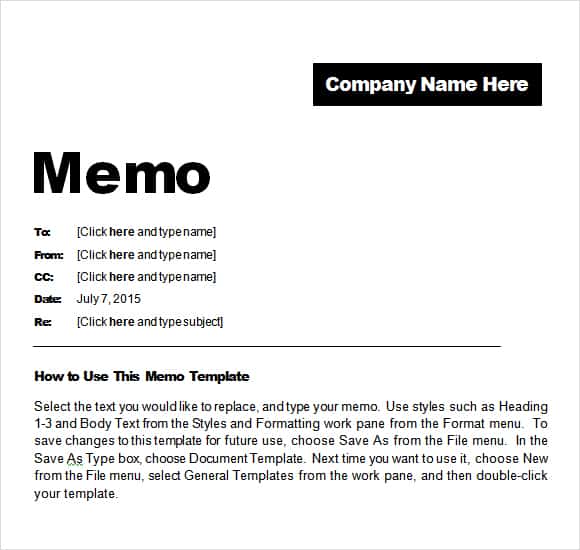

Professional Memo Template PDF
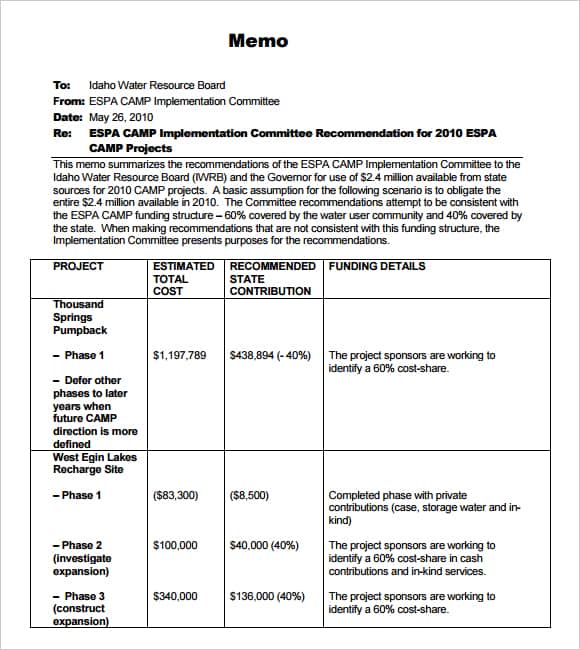
Sample Memo Template PDF
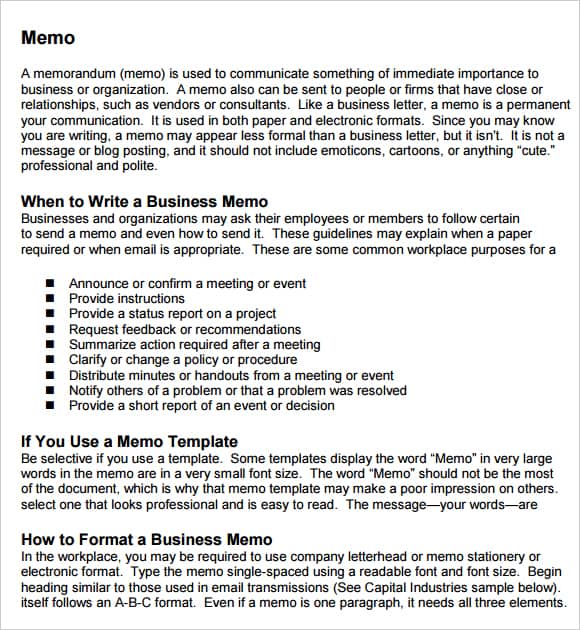
Memo Format Template PDF
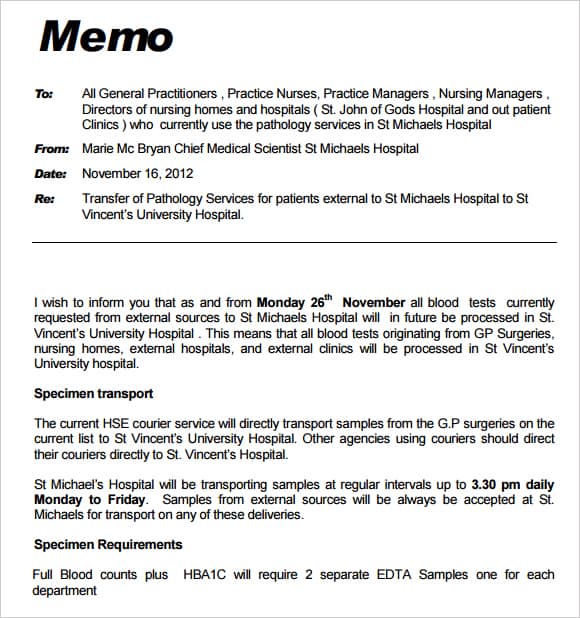
Memo Template FAQs
Which memo template should I choose?
Choose the editable Word file when you need to customize the content and branding. Use the PDF examples for layout reference or stable printing.
What belongs in a memo heading?
Most memos include To, From, Date, and Subject. Add CC, department, reference, or confidentiality fields when required.
How long should a memo be?
Routine messages often fit on one page. Complex recommendations may take two or three pages with supporting attachments.
Can a memo be sent by email?
Yes. It can be placed in the email body or attached as a Word or PDF document, depending on the need for editing and recordkeeping.
What is the best opening?
State the purpose, main point, required action, and important date. Do not make the reader search through background first.
Is a memo appropriate for confidential information?
Only with the proper recipient limits, secure systems, classifications, and organizational approvals. A confidentiality label alone is insufficient.
Can a memo change a policy?
Only when issued through the authorized process. Link the controlled policy and obtain required legal, HR, compliance, or leadership review.
Should a memo be signed?
Practices vary. A typed name and role may be enough, while formal notices may require an approved electronic or handwritten signature.
What is the difference between a memo and a report?
A memo communicates a focused internal message or recommendation. A report usually contains more extensive evidence, findings, analysis, and appendices.
Are these memo templates free?
Yes. Download and adapt them for legitimate internal business, school, nonprofit, or organizational communication.