
A name badge looks simple until you have to make fifty of them by tomorrow morning. Then the questions arrive: How large should the name be? Does the job title matter? Will the badge fit the holder? Can a guest read it without leaning uncomfortably close?
This free name badge card template gives you an editable Microsoft Word layout for workplaces, conferences, schools, volunteer programs, exhibitions, training sessions, reunions, community events, and visitor registration. Replace the sample details, add approved branding, and print a consistent set without designing every badge from the beginning.
The One Job Every Name Badge Must Do
A badge should help people identify and address one another comfortably. Everything else—logo, color, role, organization, QR code—is secondary.
If the wearer’s name is hard to read, the badge has failed even if it matches the brand perfectly. Design from normal social distance, not from the close-up view on a computer screen. Print one sample, place it in the actual holder, and ask someone to read it from a few feet away.
What Belongs on a Name Badge?
The answer depends on the event. Use the smallest set of details that helps people interact or perform their roles.
Preferred Name
Give the preferred or first name the strongest visual priority. If the setting requires a legal name for access control, handle that through the official credentialing process rather than forcing unnecessary personal details onto the visible design.
Surname
A full name is useful at professional events, large organizations, and settings where several attendees share a first name. Smaller social gatherings may need only a first name.
Role, Position, or Relationship
A line such as Speaker, Volunteer, Exhibitor, Staff, Parent, Graduate, or Event Organizer can help guests find the right person. Job titles are useful when they aid conversation, not simply because the database contains them.
Company or Organization
Include an organization at conferences, trade shows, networking events, and multi-company training. Keep it below the name and avoid shrinking the person’s identity to make room for a long company name.
Event or Brand Mark
A small logo or event name can create consistency and make official badges recognizable. Use only artwork you are authorized to reproduce.
Optional Pronouns
When pronouns are included, offer a respectful and voluntary process. Do not guess or require public disclosure without a legitimate, carefully considered policy.
Optional Codes
A barcode, QR code, registration number, access level, or meal indicator may support event operations. Keep operational codes separate from the readable name area and avoid exposing data that should remain private.
Information That Usually Does Not Belong
A visible name badge should not become a portable personnel file. Avoid adding home addresses, personal telephone numbers, birth dates, employee numbers, medical details, full account identifiers, or any information the wearer does not need to display publicly.
For children and vulnerable groups, take extra care. Follow organizational safeguarding policies and consider whether a first name, group color, or staff-controlled identifier is more appropriate than a full name and institution.
Choose the Badge Type Before Designing
The physical format determines the available space.
Adhesive Name Labels
These are economical for short events and walk-in registration. Test the adhesive on fabric guidance from the supplier; some labels do not hold on textured clothing and others may leave residue.
Plastic Holders With Inserts
Reusable holders suit conferences, training, and visitor programs. Measure the insert area rather than the outside of the holder. Allow safe margins so text does not disappear behind seams or clips.
Lanyard Badges
Lanyards provide room for event branding, schedules, access codes, and sponsor information. They can rotate or hang too low, so keep the name large and consider double-sided printing if visibility from both sides matters.
Magnetic Badges
Magnets protect clothing from pinholes and suit regular staff use. They may not be appropriate for every person or environment, including situations involving certain medical devices or safety constraints. Provide alternatives.
Pin or Clip Badges
These are widely available and secure, but pins can damage delicate clothing. Clips need an edge, pocket, or lapel. Offer a choice when possible.
Name Badge Design That Works in Real Rooms
Event lighting, movement, and crowded spaces are less forgiving than a desktop preview.
Make the Name the Largest Element
A useful hierarchy often looks like:
- Preferred name
- Surname
- Role or organization
- Event or logo
For a friendly community event, the first name may be dramatically larger than everything else. At a legal, academic, or diplomatic gathering, full-name treatment may be more balanced.
Use High Contrast
Dark text on a light background is reliable. Light text can work on a solid dark field, but test printing carefully. Busy photographic backgrounds reduce legibility and rarely justify the tradeoff.
Limit Typefaces
Use one or two readable fonts. Scripts and novelty fonts make names harder to scan, particularly for attendees with low vision or people reading unfamiliar names.
Do Not Rely on Color Alone
Color can identify staff, speakers, or access groups, but pair it with a word, icon, letter, or pattern. This improves accessibility and prevents confusion under poor lighting or monochrome printing.
Name Badge Examples by Setting
Conference Attendee
AMINA
Amina Shah
Bright Path Analytics
The preferred name is easy to scan, while the full name and company support networking.
Volunteer
MARCUS
VOLUNTEER
Ask me for help
The role is obvious, and the final line tells visitors what interaction is welcome.
School Event
Ms. Rivera
Science Department
STAFF
This avoids displaying unnecessary personal information while making the role clear.
Visitor Badge
VISITOR
Taylor Kim
Host: Facilities Team
Visitor credentials may need issue and expiry information, but those requirements should come from the organization’s security policy.
How to Prepare a Badge List
The design is only half the work. Clean source data prevents most production errors.
Create columns for:
- Preferred name
- Surname
- Title or role
- Organization
- Badge category
- Pronouns, if voluntarily supplied
- Access or operational code
- Print status
Keep each detail in its own column. This makes it easier to change formatting, sort groups, and use mail merge. Remove duplicates, identify blank fields, and confirm unusual capitalization before generating badges.
Mail Merge for Large Badge Sets
Microsoft Word mail merge can turn a spreadsheet into dozens or hundreds of badge inserts. A careful workflow is:
- Finalize the badge dimensions and layout.
- Prepare a clean spreadsheet with one attendee per row.
- Connect Word to the data source.
- Insert the name, role, and organization fields.
- Preview records with very short and very long names.
- Check blank organizations or titles.
- Merge to a new document rather than directly to the printer.
- Review several pages.
- Print a small physical test batch.
- Produce the final set after approval.
Long names may require a slightly smaller font, a second line, or a wider text box. Never cut a person’s name without checking the preferred form.
Using Color to Organize an Event
A badge can help staff understand roles at a glance. For example:
- Blue band plus “ATTENDEE”
- Green band plus “VOLUNTEER”
- Gold band plus “SPEAKER”
- Red band plus “STAFF”
- Purple band plus “EXHIBITOR”
Choose colors that remain distinct in print and pair them with text. If colors indicate restricted access, do not rely on the badge design alone; follow the venue’s proper credential and security process.
QR Codes and Smart Badges
A QR code can link to an attendee profile, agenda, check-in record, contact exchange page, or event app. It should not expose personal information merely by being scanned.
Before adding one:
- Confirm the destination is secure and appropriate.
- Give attendees notice about what the code does.
- Keep sufficient blank space around the code.
- Test scans from a printed badge inside the holder.
- Plan for poor connectivity or dead phone batteries.
- Provide a non-digital alternative.
Do not use a QR code as decoration. If it does not improve the experience, leave it out.
Editing the Name Badge Card Template
- Download the Word file and save an untouched master.
- Measure the intended holder or label sheet.
- Replace the sample name, title, and organization.
- Add approved event branding.
- Increase the preferred name until it is readable at a distance.
- Test the longest expected name.
- Remove unnecessary fields.
- Duplicate the layout or connect a mail-merge list.
- Print a draft at 100% scale.
- Insert, clip, pin, or wear the sample and test it in the venue.
Printer settings can scale documents automatically. Disable “fit to page” when exact badge dimensions are required, unless the label manufacturer instructs otherwise.
Printing and Assembly
Use paper or cardstock recommended for the badge holder or label product. Precut label sheets must match the template alignment precisely. Print one sheet first and hold it behind the label stock to check registration before using an entire box.
For insert badges, a paper cutter produces cleaner edges than scissors. Keep badges alphabetized for registration. If attendees will collect them from a table, arrange them by surname and provide a separate area for walk-ins and corrections.
Print spares with blank name fields and keep a laptop, printer, markers, and extra holders at registration. Even a perfectly prepared list will face last-minute changes.
Badge Placement and Wearing Comfort
Badges are generally easiest to read on the upper chest. Lanyards may hang lower or turn backward. Clips and magnets can shift on loose fabric. Give wearers a choice where practical and avoid insisting on a method that damages clothing or causes discomfort.
If photographs are being taken, be aware that badges may display names or organizations publicly. Tell attendees when official images will be shared and follow applicable privacy and event policies.
Security: Identification Is Not Authentication
A printed name badge helps people identify one another, but it is not automatically a secure credential. Designs can be copied, badges can be exchanged, and visual checks can be missed.
Organizations that need controlled access should use appropriate registration, identity verification, staff training, entry monitoring, expiry, and revocation processes. Do not treat this general Word template as a substitute for a professional access-control system.
Frequent Badge Mistakes
The logo is larger than the name. Brand recognition should not prevent human recognition.
Every database field is printed. Display only what helps the event.
Long names overflow. Test extremes before merging the complete list.
Role colors have no labels. Pair color with words or symbols.
The holder hides the bottom line. Measure the usable insert area.
Badges are alphabetized by first name while registration searches by surname. Choose one system and train the desk team.
No replacement process exists. Keep blanks and record reissues when credentials affect access.
Download the Free Name Badge Card Template
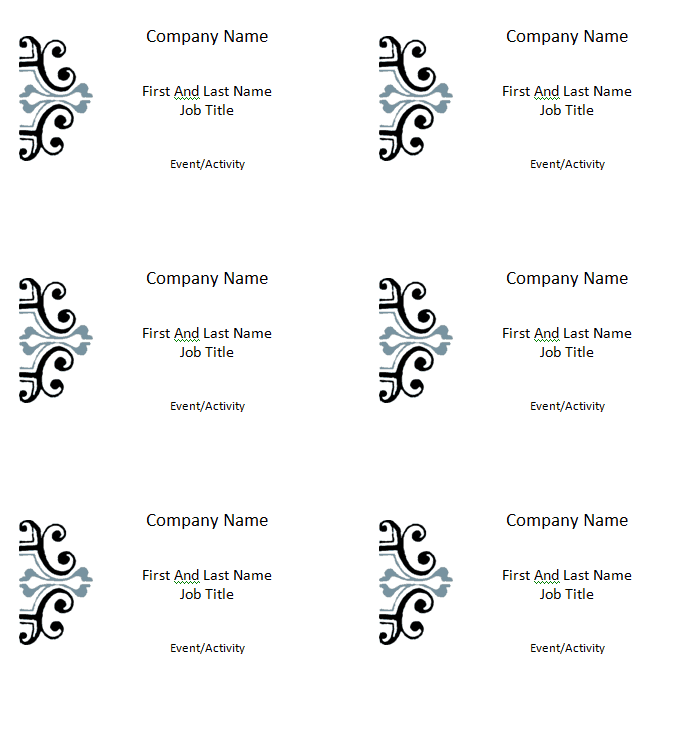
The preview below shows the editable badge layout. Customize it for the intended holder and event, protect personal data, and print a physical test before producing the full set.

Name Badge Template FAQs
What information should a name badge include?
Usually a preferred name is essential. Add a surname, role, or organization only when it helps people interact or manage the event.
How large should the name be?
It should be the most prominent text and readable from normal conversational distance. Test a printed badge in its actual holder.
Can I use the template with mail merge?
Yes. Connect the Word layout to a clean spreadsheet and merge to a review document before printing.
Should badges show pronouns?
Pronoun display should be respectful and voluntary. Do not guess, and consider the event’s privacy and inclusion policy.
Are name badges secure identification?
Not by themselves. A visible badge supports recognition but should not replace proper access control, identity verification, or security procedures.
Can I add a QR code?
Yes, when it serves a clear purpose and protects attendee data. Test the printed code and provide a non-digital alternative.
What badge attachment is best?
It depends on duration, clothing, venue, budget, and safety needs. Offer alternatives to pins, magnets, clips, or lanyards when possible.
How many spare badges should I print?
Keep blank inserts, holders, and supplies for walk-ins, corrections, damage, and replacements. Larger events need a more formal reissue process.
Can children wear full-name badges?
Use caution and follow safeguarding policies. A first name, group identifier, or staff-managed system may be more appropriate than publicly displaying full personal details.
Is this name badge template free?
Yes. Download and customize the Word file for your legitimate workplace, school, conference, visitor, volunteer, or community event.