
A memo is useful when a message needs more structure than a chat and less ceremony than a formal report. It gives employees one place to find the subject, decision, background, responsibilities, dates, and next step.
This free memo template for Microsoft Word is designed for internal business communication. You can adapt it for policy changes, procedure updates, meeting follow-ups, announcements, requests, project decisions, safety notices, operational instructions, and other workplace messages. The format is simple on purpose: a reader should understand the reason for the memo before reaching the second paragraph.
When a Memo Is the Right Choice
Use a memorandum when the message:
- Applies to a defined internal audience
- Needs a stable reference that can be saved or printed
- Explains a policy, process, decision, or action
- Requires more context than a short email
- Should follow a consistent organizational format
- May need acknowledgment, distribution, or recordkeeping
A memo is usually not the best first channel for an urgent emergency, confidential employee matter, complex negotiation, or sensitive conversation. Those may require direct contact, secure systems, formal notices, legal review, or a combination of communication methods.
Memo, Email, Letter, or Report?
The boundaries overlap, but the purpose differs.
- Email: fast transmission and routine conversation
- Memo: structured internal communication and reference
- Business letter: formal communication, often with an external recipient
- Report: detailed findings, analysis, evidence, and recommendations
A memo may be delivered by email as a PDF attachment. The channel is email; the document is still a memo.
The Standard Memo Heading
Most business memos begin with four fields:
- To: recipient or group
- From: author and role
- Date: issue date
- Subject: a specific description of the message
Organizations may also include CC, reference number, department, confidentiality label, distribution list, response deadline, or document owner.
A subject line such as “Update” is too vague. Prefer “New Expense Approval Process Effective October 1” or “Decision Required: Warehouse Access Schedule.” A searchable subject helps readers find the document later.
Put the Main Point First
The opening should state the purpose and required action. Do not make readers work through a long history before learning why the memo exists.
A direct opening could be:
Beginning October 1, purchases above $500 require department-head approval before an order is placed. This memo explains the new workflow and the steps employees must complete.
If no action is required, say so:
This memo summarizes the office relocation schedule for awareness. Individual packing instructions will follow next week.
A Flexible Memo Structure
After the heading and opening, use only the sections the reader needs.
Purpose
State why the memo is being issued and what the reader should know or do.
Background
Provide enough context to understand the change or decision. Keep history relevant and separate verified facts from interpretation.
Details
Explain the policy, process, schedule, result, request, or instruction. Use headings, bullets, and numbered steps for scanability.
Responsibilities
Name the person or role responsible for each action. Avoid assigning work to “everyone” when accountability matters.
Dates
State effective dates, deadlines, transition periods, and review dates. Use full dates when ambiguity is possible.
Questions and Support
Give a contact, channel, or meeting where people can obtain clarification.
Attachments or References
List related policies, forms, procedures, maps, schedules, or evidence.
Write for Action
If the memo asks readers to do something, make the instruction unmistakable. A useful action statement includes:
- What must be done
- Who must do it
- How it should be done
- When it is due
- Where to find tools or support
- What happens afterward
Compare:
Weak: Please update your details soon.
Clear: All employees should review their emergency contact information in the HR portal by Friday, October 9. Select “Personal Details,” make any changes, and click “Confirm,” even if no update is needed.
Policy Change Memo
A policy memo should identify the policy, reason for change, effective date, affected people, main requirements, transition arrangements, exceptions, responsible owner, and location of the full policy.
Do not summarize a legal or compliance policy so loosely that the summary conflicts with the approved text. Link or attach the controlled version and obtain the required review before distribution.
Procedure Memo
For a new process, number the steps and specify decision points. Include screenshots or a flowchart only when they clarify the work. Test the instructions with someone unfamiliar with the process.
Example:
- Complete the request form.
- Attach the vendor quote and budget code.
- Send it to the department approver.
- After approval, forward the package to Procurement.
- Do not place the order until Procurement issues confirmation.
State what to do when the normal path does not apply.
Decision Memo
A decision memo records a question, options considered, recommendation or decision, rationale, constraints, owner, and follow-up actions.
Keep evidence close to the conclusion. If the decision carries financial, legal, safety, privacy, or regulatory implications, identify the appropriate review and preserve the approved record.
Meeting Follow-Up Memo
A meeting summary becomes useful when it captures outcomes rather than replaying the conversation. Include:
- Meeting date and purpose
- Decisions made
- Actions, owners, and due dates
- Open questions
- Items deferred
- Next review point
Circulate it promptly and provide a reasonable way to correct factual errors.
Safety and Emergency Memos
Safety communication must be accurate, accessible, and aligned with applicable procedures. State the hazard or concern, immediate precautions, responsible contacts, reporting method, effective period, and where to find the official plan.
A memo alone may be inadequate for urgent or high-risk conditions. Use alarms, direct briefings, signage, training, drills, emergency channels, or specialist review as required. Never rely on a general template to determine safety obligations.
Bad-News Memos
When the message involves cancellation, delay, cost reduction, rejection, or loss, clarity and respect matter. State the decision without burying it, explain the reason to the extent appropriate, acknowledge the impact, describe available support or alternatives, and provide a contact.
Avoid cheerful language that contradicts the seriousness of the news. Do not speculate, assign blame without evidence, or disclose confidential details.
Audience and Tone
A memo to senior leaders may be concise and decision-focused. A memo to all staff may need plain language, definitions, translations, accessible formats, and several support channels. A technical team may need exact specifications.
Professional does not mean cold. Use direct sentences, familiar words, and a respectful tone. Prefer “Submit the form by Friday” to “It is hereby requested that the aforementioned documentation be furnished.”
Formatting for Easy Scanning
Use short paragraphs and descriptive headings. Bullets work for lists; numbers work for ordered steps. Bold only the information readers must notice, such as an effective date or required action.
Keep margins, fonts, spacing, and heading levels consistent. If the memo runs beyond two or three pages, consider an executive memo with a supporting report or appendix.
Accessibility and Inclusion
Use readable font sizes, strong color contrast, meaningful link text, and heading styles rather than visual formatting alone. Add alt text to informative images. Do not communicate status using color only.
Provide alternative formats or language support when the audience needs them. Avoid unexplained acronyms and culturally specific expressions that may confuse readers.
Privacy and Confidentiality
Include only information the audience needs. Do not circulate personal data, medical information, disciplinary details, account credentials, or confidential commercial material broadly.
A “confidential” label does not secure a document. Use approved storage, permissions, encryption, distribution, retention, and disposal controls. Seek HR, privacy, security, or legal guidance when appropriate.
A Complete Short Memo Example
To: All Customer Support Employees
From: Director of Service Operations
Date: September 22, 2026
Subject: New Escalation Form Effective October 5
Beginning October 5, all urgent technical escalations must use the new form in the service portal. The change gives engineering a consistent problem summary and reduces follow-up requests.
Before submitting, include the customer impact, steps already attempted, screenshots or logs where authorized, and the required response time. Select “Urgent Escalation” from the portal menu; do not send customer credentials or unapproved personal data.
Team leaders will demonstrate the process during next week’s huddles. The current email route will remain available through October 9, then close. Questions should be sent to the Service Operations channel.
The example works because the purpose, date, process, transition, data caution, training, and support are visible.
Review Before Distribution
Check the memo for:
- Correct recipients and distribution scope
- A clear, searchable subject
- Purpose in the opening paragraph
- Accurate names, dates, links, and references
- Defined actions, owners, and deadlines
- Consistency with approved policy
- Appropriate confidentiality and access
- Accessible language and formatting
- Required approvals
- Removal of comments and tracked changes
Ask someone outside the drafting process to identify the required action. If they cannot, revise.
Distribution and Recordkeeping
Choose a channel that reaches the entire audience. Email may be enough for office staff; frontline, field, or shift workers may also need a portal notice, printed copy, briefing, or supervisor acknowledgment.
Keep the final approved version, issue date, distribution record, and superseded version according to policy. If the memo changes an instruction, make it clear which earlier communication it replaces.
Customize the Template in Word
Save an untouched copy, then add the organization’s name, logo, memo fields, reference system, approved fonts, footer, confidentiality marking, and contact details. Create reusable heading styles and placeholder instructions, but remove every placeholder before sending.
A controlled master prevents teams from using conflicting formats. Assign an owner to review the template when branding, policy, or accessibility standards change.
Download Your Free Memo Template
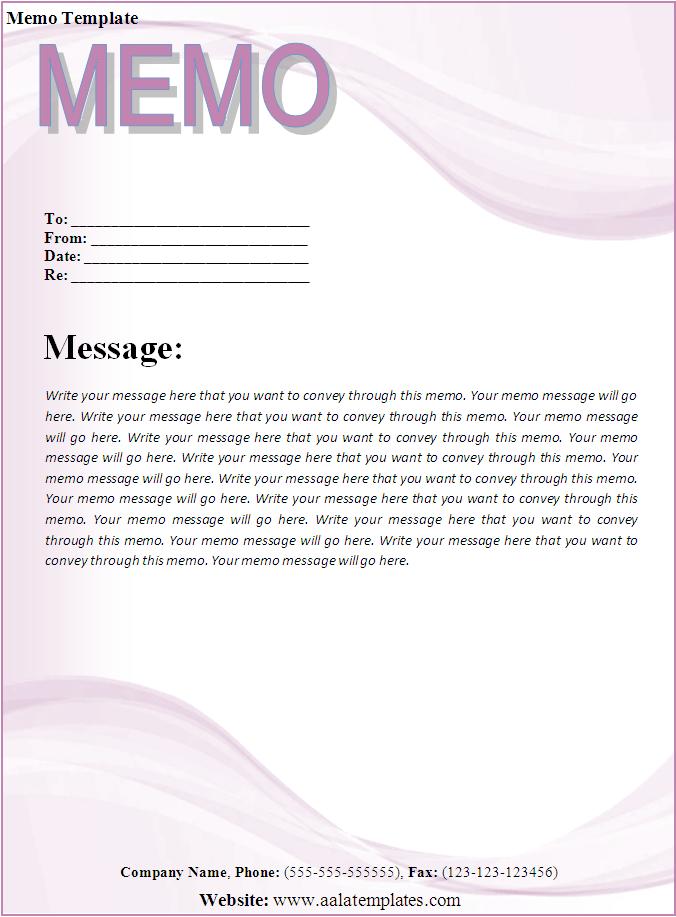
Preview the editable layout below, then download the Microsoft Word file. Tailor the memo to one audience, state the action early, and verify the final version before distribution.

Memo Template FAQs
What is a memo?
A memorandum is a structured document used primarily for internal communication about a policy, decision, request, update, instruction, or announcement.
What fields belong in the heading?
Most memos include To, From, Date, and Subject. Organizations may also add CC, reference numbers, departments, or confidentiality labels.
How should a memo begin?
State the purpose and required action in the opening paragraph. Readers should not have to search for the main point.
How long should it be?
Many memos fit on one or two pages. Use a supporting report or appendix when evidence and analysis require more detail.
Does a memo need a signature?
Practices vary. Some organizations use a typed name and role, while formal or controlled notices may require approval or an electronic signature.
Can I send a memo by email?
Yes. The memo can appear in the email body or as an attached PDF. Use a channel that reliably reaches the intended audience.
What is the difference between a memo and a letter?
Memos are generally internal and structured for workplace communication. Letters are often more formal and directed to external recipients.
Can a memo change company policy?
Only when issued through the organization’s authorized governance process. Link the controlled policy and obtain HR, legal, compliance, or leadership review as required.
How do I mark a memo confidential?
Use the organization’s classification label and secure handling rules. A label alone does not protect the information.
Is the memo template free?
Yes. Download and customize the Word template for legitimate internal business, nonprofit, school, or organizational communication.