
A payslip should let an employee answer three questions without decoding payroll jargon: What did I earn? What was deducted? What amount was actually paid? A reliable document also gives payroll teams a traceable record tied to the pay period and underlying payroll calculation.
This free payslip template for Microsoft Word provides an editable starting point for small employers and administrative use. Customize it for the organization’s payroll system, pay frequency, currency, benefits, deductions, and current local requirements. A template does not calculate statutory payroll or replace payroll software, professional advice, or required filings.
Payslip, Pay Stub, and Payroll Record
The terms payslip, pay stub, earnings statement, and wage statement are often used for the employee-facing summary of a payment. The payroll register is the employer’s broader record across employees and periods. A paycheck or bank transfer delivers money; the payslip explains the calculation.
Local law may prescribe the information, timing, format, delivery, language, and retention of wage statements. Some deductions require specific authorization or wording. Confirm requirements with current official guidance and qualified payroll, tax, HR, and legal professionals.
Employee and Employer Details
Common identifying fields include the employer’s legal or trading name, address, payroll contact, employee name, employee or payroll ID, department, position, pay period, payment date, and payment method. Use internal identifiers carefully and avoid exposing unnecessary personal data.
Do not print full bank-account numbers, national identity numbers, tax credentials, passwords, medical details, or other sensitive information unless a specific lawful requirement applies. Mask identifiers where possible and restrict access to completed payslips.
Gross Earnings
Show how gross pay was built. Depending on the worker and jurisdiction, lines may include:
- Regular hours, rate, and amount
- Overtime hours, multiplier, rate, and amount
- Salary for the pay period
- Shift, weekend, or location premiums
- Commission, bonus, or incentive pay
- Holiday, vacation, sick, or other paid leave
- Allowances, reimbursements, tips, or taxable benefits
- Retroactive pay, corrections, or other earnings
Label items precisely. An allowance, expense reimbursement, and taxable benefit may receive different payroll or tax treatment. Do not decide treatment from the template; use current rules and professional guidance.
Deductions
Group deductions so employees can understand them. Statutory deductions may include income tax, social insurance, pension, or local payroll charges. Voluntary or authorized deductions may include benefits, retirement contributions, loan repayments, union dues, savings plans, or other items.
State each deduction and amount separately where required. Avoid a single “other deductions” total that hides the reason. Verify authorization, limits, priority, and post-tax or pre-tax treatment through the payroll process.
Net Pay
The basic reconciliation is:
Gross earnings minus employee deductions equals net pay, subject to the payroll rules and rounding used in the jurisdiction.
Make net pay prominent and show the currency. If the amount is split between bank accounts, cash, check, or another approved method, state the allocation without revealing full financial details.
Current Period and Year-to-Date Figures
Many payslips show both the current period and year-to-date totals for earnings, taxes, deductions, and sometimes employer contributions. This helps employees monitor cumulative figures and helps payroll teams identify unexpected changes.
Define the year basis correctly-calendar, tax, fiscal, or another authorized period. At rollover, test opening balances and the treatment of late adjustments. A year-to-date column that resets incorrectly can mislead employees even when the current payment is accurate.
Leave and Time Information
If the payslip shows leave, distinguish entitlement, accrued balance, taken leave, and remaining balance. Hours worked, overtime, absences, and unpaid leave should tie to the approved timekeeping record.
Leave presentation and accrual rules vary. Some balances may not be required or appropriate on the payslip. Reconcile displayed information with the HR or timekeeping system so two official records do not conflict.
Employer Contributions
Employer-paid pension, insurance, tax, or benefit amounts may appear for transparency even though they do not reduce the employee’s net pay. Separate them clearly from employee deductions. Otherwise, a worker may believe an employer contribution was withheld from wages.
Payroll Calculation Workflow
- Confirm active employee and compensation data.
- Close and approve time, leave, commission, and variable inputs.
- Import or enter authorized changes.
- Calculate gross-to-net payroll under current rules.
- Review exceptions, unusual changes, and negative or zero payments.
- Approve payroll under the organization’s authority process.
- Release payment and issue payslips securely.
- Post payroll, reconcile funding and liabilities, and retain records.
A Word template may support a manual statement, but it should not become an uncontrolled calculation engine. For recurring payroll, use a reliable system and independent review proportionate to risk.
Quality-Control Checks
Compare gross totals, deductions, net pay, headcount, and funding with expected results and prior periods. Review new starters, leavers, bank changes, large overtime, bonuses, retroactive adjustments, duplicate employees, missing deductions, and unusual net-pay changes.
Recalculate a sample independently. Confirm the sum of individual net payments matches the payment file, and reconcile payroll liabilities to the accounting entries. Investigate differences before release rather than correcting them quietly afterward.
Corrections and Off-Cycle Payments
If a payslip is wrong, preserve the original record, document the error, calculate the correction under the approved process, and issue a corrected statement. Do not overwrite a finalized document without an audit trail.
State whether the adjustment affects the current period, prior period, year-to-date totals, taxes, leave, or employer contributions. Off-cycle payments should receive the same approval and security controls as regular payroll.
Secure Electronic Delivery
Email attachments can expose payroll data through mistyped addresses, forwarded messages, shared inboxes, or weak passwords. Use an authenticated employee portal or another approved secure method where possible. Apply access controls, encryption, logging, retention, and timely removal for former employees.
If password-protected files are used, send credentials through a separate approved channel and avoid predictable passwords based on public personal information. Test the employee experience, including access from assistive technology and mobile devices.
Printed Payslips
Printed statements should be folded, sealed, or placed in envelopes so pay information is not visible. Control printer access, collect misprints immediately, and distribute documents only through an approved method. Do not leave payslips in open trays or ask employees to search through a shared stack.
If an employee authorizes another person to collect a statement, follow a documented identity and authorization process. Destroy duplicate or spoiled copies securely.
Design for Clarity
Use a plain structure with employee and period details at the top, earnings and deductions in aligned tables, totals below, and notes or employer contributions in clearly labeled sections. Right-align monetary amounts and keep decimal places consistent.
Avoid overly small text, weak contrast, decorative backgrounds, and unexplained abbreviations. If a code such as “OT1.5” or “RET-EE” appears, provide a legend or use a clearer label. The employee should not need payroll training to understand ordinary lines.
How to Customize the Word Template
Keep an untouched master and edit a copy. Add the employer identity, pay frequency, currency, earning and deduction categories, year-to-date columns, approval reference, and payroll contact. Remove fields that do not apply.
Do not type spaces to align figures. Use a well-structured table with fixed headings and tested row expansion. Protect formulas and fixed labels if the file performs calculations, but review every result independently. Test long employee names, several earning lines, negative adjustments, zero values, and a second page.
Accessibility and Language
Use real text, meaningful heading order, readable type, strong contrast, and tables with clear headers. A scanned image may be inaccessible and difficult to search. Provide an accessible electronic format and reasonable accommodations where required.
If employees need another language, use a professionally reviewed translation and keep payroll terms consistent. A translated label must still align with the official payroll calculation and local legal wording.
Record Retention
Retention periods vary by jurisdiction, record type, dispute, audit, and industry. Store payslips and underlying payroll records under a documented schedule. Protect confidentiality throughout storage and disposal.
Backups should be secured and recoverable. Test whether an authorized person can retrieve the correct statement by employee and period without browsing unrelated employee data.
Employee Questions and Disputes
Give employees a clear payroll contact and explain the information they should provide, such as the pay period and disputed line. Confirm receipt of the query and investigate against time, compensation, authorization, payroll, and payment records.
Do not discourage lawful wage questions or retaliate against an employee for raising an issue. Escalate suspected underpayment, unlawful deduction, discrimination, fraud, or systemic calculation errors to qualified professionals and authorized management.
Common Payslip Mistakes
- Wrong employee, pay period, or payment date
- Hours or rates not matching approved records
- Overtime shown without its multiplier or basis
- Deductions combined under vague labels
- Employee and employer contributions mixed together
- Incorrect year-to-date totals
- Full sensitive identifiers or bank details displayed
- Manual formulas overwritten or rounded incorrectly
- Insecure email or printed distribution
- Corrected statements issued without an audit trail
Final Payroll Review
Before releasing payslips, confirm that payroll is approved, payment totals reconcile, statements match the final calculation, sensitive data is protected, and the delivery method is ready. After release, reconcile the bank or payment file and investigate rejections promptly.
A clear payslip cannot fix an incorrect payroll, but it makes errors easier to spot. Accuracy comes from controlled source data, calculation, review, approval, payment, and recordkeeping working together.
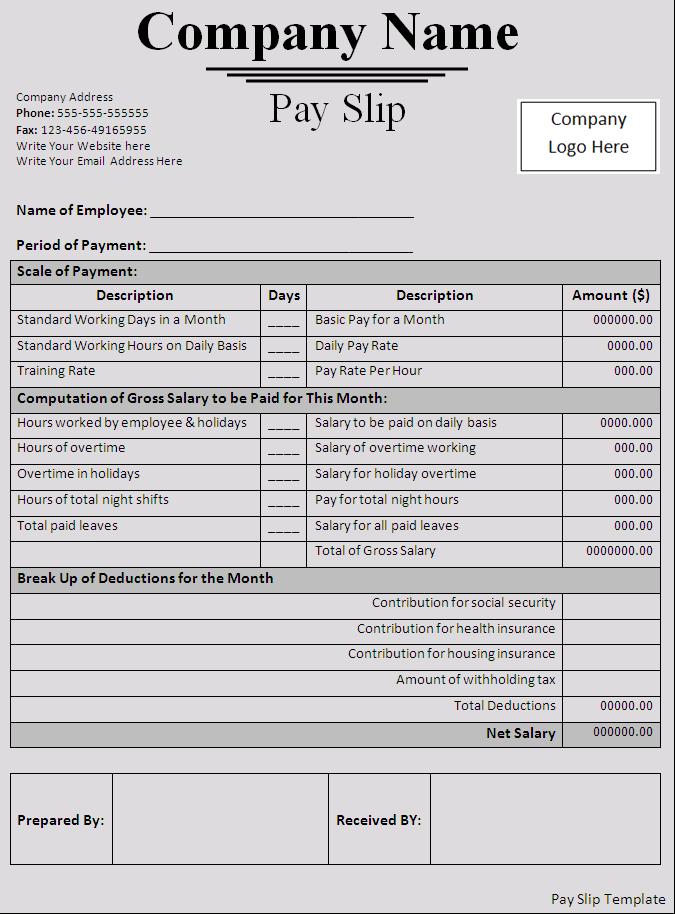
Preview and Download the Payslip Template
Review the original preview below, then download the editable ZIP. Check the structure against current payroll, employment, tax, privacy, accessibility, and recordkeeping requirements before operational use.

Payslip Template FAQs
What should a payslip show?
Common fields include the employee and employer, pay period, payment date, earnings, hours or rates, deductions, gross pay, net pay, and required cumulative figures.
Is a payslip the same as a paycheck?
No. The payment delivers wages; the payslip explains how the amount was calculated.
Should overtime appear separately?
Where applicable, show overtime hours, rate or multiplier, and amount clearly under current local requirements.
Can employer contributions appear on the payslip?
Yes, when appropriate, but separate them from employee deductions so they are not mistaken for withheld wages.
Can I email payslips?
Use a secure, lawful delivery method. An authenticated portal is often safer than ordinary attachments containing sensitive payroll data.
How should a payroll error be corrected?
Preserve the original record, document and approve the correction, update cumulative totals where necessary, and issue a corrected statement.
Can I edit this template in Word?
Yes. Customize a copy, but use a controlled payroll calculation and independent review rather than relying solely on a manual document.
How long should payslips be retained?
Retention depends on jurisdiction, record type, disputes, audits, and policy. Confirm the current requirements that apply to the employer.