
A postcard is wonderfully economical: one image, a few well-chosen words, and no envelope standing between the message and the reader. That simplicity is also what makes postcards surprisingly difficult to design. There is nowhere for a weak headline, crowded layout, or missing address detail to hide.
This free postcard template gives you an editable foundation for personal mail, small-business promotions, announcements, travel notes, invitations, and direct-mail campaigns. Customize the front and back in Microsoft Word, add your own photograph or artwork, and prepare the card for home printing or a professional print service.
Think of a Postcard as Two Different Experiences
The front earns attention. The back completes the job.
On the front, a photograph, illustration, headline, or offer should communicate one strong idea. On the back, the reader needs a short message, sender details when appropriate, the recipient’s address, and room for postage. Treating both sides as one crowded canvas usually leads to a card that looks attractive but is hard to mail—or easy to mail but not worth reading.
Before editing the template, decide which side will do what. That single choice creates more clarity than adding another decorative element.
Personal Postcard Ideas
Postcards are not limited to vacation greetings. Their compact format works whenever the message should feel cheerful, immediate, and easy to display.
Travel Notes
A travel postcard does not need to summarize an entire trip. Share one vivid moment: the sound of a market in the morning, the view from a train, the unexpected meal you loved, or the weather that changed every plan. One real detail makes the note feel present.
Moving Announcements
Use the front for a new-home photograph, illustration, or simple “We’ve Moved” headline. Put the new address and effective date on the back. If the card goes to professional contacts, keep the design readable enough to file.
Save-the-Date Cards
A postcard is useful for an early announcement when a formal invitation will follow. Include the names, date, city or venue area, and a wedding or event website if available. Avoid promising details that have not been confirmed.
Birth and Family Announcements
A photograph can take center stage, with a brief message and essential details on the reverse. Share only information the family is comfortable sending openly because postcard content is not enclosed.
Holiday Greetings
Seasonal postcards are quick to prepare and economical to mail. A short handwritten line can keep a batch-produced design from feeling impersonal.
Thank-You Notes
Postcards can carry casual thanks after a community event, small purchase, stay with friends, or volunteer project. For private, sensitive, or deeply personal thanks, a folded card or letter may be more appropriate.
Business Uses for a Postcard Template
For a small business, a postcard can be both advertisement and reminder. There is no envelope to open, so the central message can be seen immediately. That advantage disappears if the design tries to sell too many things.
New-Customer Introduction
Introduce the business with one clear service, a concise benefit, and a specific next step. A local landscaping company might feature a seasonal service and booking link rather than listing every job it performs.
Limited-Time Promotion
State the offer, eligibility, deadline, and redemption method. If conditions are extensive, direct readers to a landing page instead of reducing the print to an unreadable size.
Appointment Reminder
A postcard can remind customers about dental visits, maintenance, annual inspections, or recurring services. Be cautious with personal and health-related details because the message is visible during delivery.
Event Invitation
Use postcards for open houses, exhibitions, store launches, workshops, community meetings, and fundraising events. Give the date and location visual priority, then add an RSVP method.
Customer Reactivation
A thoughtful “We’d love to see you again” card can reconnect with past customers. Refer to the relationship respectfully and provide a genuine reason to return, such as a new service, refreshed space, or relevant seasonal offer.
Neighborhood Marketing
Home-service providers, cafés, fitness studios, real estate professionals, tutors, and pet services can target nearby customers. Make the local connection clear. A recognizable landmark or service-area statement can feel more relevant than generic stock imagery.
Build the Front Around One Message
A strong postcard front can often be described in a single sentence. If you cannot summarize it, the recipient may not understand it at a glance either.
A practical hierarchy is:
- Image or visual focal point
- Main headline
- One supporting line
- Optional logo or sender name
Examples of focused front-cover messages include:
- Wish You Were Here
- We’ve Moved—Come Visit
- Save the Date: June 12
- 20% Off Spring Garden Cleanup
- Join Us for the Studio Open House
- A Little Thank You From Our Team
Resist the urge to put the full message on the picture side. Let the back carry explanation and action details.
How to Arrange the Back of a Postcard
Traditional postcard backs are divided into a message area and an address area. The recipient address must remain clear, with sufficient room for postage and any postal markings. Exact size, placement, thickness, and mailing requirements differ by postal service and mailing class, so confirm current specifications before printing a large batch.
A general back layout can include:
- A short message on the left
- Sender or business details beneath the message
- Recipient name and address on the right
- A clear postage area near the upper-right corner
- An optional QR code or short web address
Keep decorative backgrounds pale behind handwriting and addresses. Sorting equipment and people both need strong contrast.
Writing a Message That Fits
The limited space is a feature, not a flaw. It encourages you to choose a detail rather than delivering a report.
A Simple Personal Formula
Try: greeting + one specific detail + warm closing.
Hi Maya—We found the quietest little beach beyond the old harbor and watched the sunset there last night. It made me think of our summer trips. Sending love from the coast! —Leah
A Simple Marketing Formula
Try: problem or desire + offer + deadline + action.
Ready for a garden you can enjoy again? Book a spring cleanup by April 15 and receive a complimentary soil assessment. Visit example.com/spring or call 555-0126.
Use natural language and specific information. Empty claims such as “best quality” or “unbeatable service” consume valuable space without giving the reader a reason to believe them.
Postcard Headline Ideas for Business
- A Fresh Start for Your Outdoor Space
- Your Next Favorite Lunch Is Around the Corner
- New to the Neighborhood? So Are We
- One Afternoon. A More Organized Home.
- Save the Date for Our Autumn Open House
- A Special Welcome-Back Offer Inside
- Planning an Event? Let’s Make the Details Easier
- Local Help, Right When You Need It
Match the headline to the real offer. Cleverness is useful only when the meaning stays clear.
Selecting an Image for the Postcard
Use an image that can survive cropping, printing, and quick viewing. High-resolution photographs with one obvious subject work well. If text will sit over the image, choose a picture with calm negative space rather than important details across the entire frame.
Only use photographs and artwork you created, purchased, licensed, or received permission to use. Images pulled from search results are not automatically free for marketing or personal reproduction.
When a postcard promotes a real product, property, location, meal, or event, authentic photography can build more trust than a generic stock image. Make reasonable corrections to brightness and color, but avoid edits that misrepresent the subject.
Typography: Fewer Fonts, Better Results
One display typeface and one highly readable supporting font are usually enough. Decorative scripts can add personality to a short title, but they are poor choices for addresses, dates, telephone numbers, and fine details.
Print a test at actual size. Type that looks comfortably large on a computer screen may become surprisingly small on a postcard. Check older recipients’ needs and use strong contrast. Thin light-gray type may disappear on a home printer.
Choosing Colors That Print Well
Screen colors are produced with light; printed colors are produced with ink. Very bright screen tones may print darker or duller. Keep important text away from low-contrast color combinations and request a printer proof for a large or expensive run.
For business postcards, use brand colors selectively. A restrained palette can make the offer feel more credible. For personal cards, draw two or three colors from the main photograph to create a coordinated design.
How to Customize the Free Postcard Template
- Download the template and extract the files if needed.
- Save a duplicate so the original remains untouched.
- Replace the front image with your photograph or approved artwork.
- Rewrite the headline and supporting message.
- Edit the back without reducing the address area excessively.
- Add sender information, a web address, or a call to action.
- Confirm the finished dimensions with the intended postal or print provider.
- Check that images are sharp and text stays inside safe margins.
- Print both sides of one test sheet.
- Trim the test to size and review it in natural light.
If you send the file to a commercial printer, ask which file format, color settings, bleed, and resolution they prefer. Exporting to PDF can reduce font and layout changes between computers.
Home Printing Tips
Check the printer manual before feeding heavy cardstock. Use the media setting closest to the actual paper type, and load a single test sheet to confirm orientation. Duplex printing can flip the back in an unexpected direction, so mark a scrap sheet and test the paper path before using good stock.
If the postcard contains multiple cards on a page, use crop marks or a paper cutter for clean edges. A ruler and craft knife can work, but protect the work surface and cut carefully. Allow ink to dry before stacking cards.
Preparing for Professional Printing
A professional printer is useful when you need consistent trimming, heavier stock, larger quantities, or postal preparation. Ask about:
- Final trim size and bleed
- Safe area for text and logos
- Preferred image resolution
- Single- or double-sided printing
- Coated versus uncoated stock
- Writable finishes on the message side
- Color proofing
- Mailing and addressing services
Do not assume a glossy finish will accept every pen or postal ink. If recipients or staff will write on the back, test the surface first.
Direct-Mail Postcard Checklist
Before approving a marketing batch, confirm that:
- The business name and contact details are correct.
- The offer is easy to understand.
- Prices, dates, and promotion conditions are accurate.
- The landing page and QR code work.
- The address area meets the mail provider’s requirements.
- The mailing list is current and lawfully obtained.
- The message follows applicable advertising and privacy rules.
- A method exists to measure responses.
Unique URLs, QR codes, promotional codes, and dedicated telephone numbers can help show which campaign generated interest. Measure conversions, not only scans or visits.
Common Postcard Design Problems
Everything is the same size. Without hierarchy, the reader does not know where to look first.
The front is overloaded. Choose one message and move supporting information to the back.
The photo is stretched. Crop proportionally instead of pulling an image wider or taller.
The address area is decorative but impractical. Mailing information needs a clean, high-contrast background.
The call to action is missing. Tell readers whether to visit, call, scan, book, reply, or keep the date.
The design was never printed. A physical proof reveals small text, dark images, trimming risks, and incorrect back orientation.
Download the Editable Postcard Template
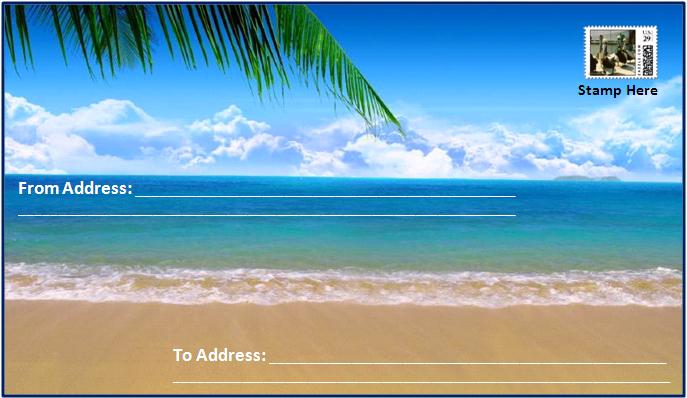
The preview shows the free postcard design. Replace its sample material with your own image and message, keep the recipient-address area clear, and verify the card against current postal requirements before producing a full mailing.

Postcard Template FAQs
Can I edit this postcard template in Microsoft Word?
Yes. You can replace the sample text and image, adjust colors and fonts, and prepare the finished layout for printing. Save a clean original before making changes.
What size should a postcard be?
Postcard sizes and mailing classifications vary by country and postal service. Choose a size accepted by your provider and confirm current thickness, address-placement, and postage requirements before printing.
Does a postcard need an envelope?
Postcards are normally mailed without envelopes. Because the message is visible, avoid including private, financial, medical, or otherwise sensitive information.
Can I use the template for business advertising?
Yes. Add your legitimate business details, an accurate offer, a direct call to action, and imagery you have permission to use. Follow applicable advertising, privacy, and mailing rules.
What belongs on the back?
Typically, the back includes the message, recipient address, postage area, and optional sender or business information. Keep postal areas clear and readable.
How do I print the front and back in the correct direction?
Test with a marked sheet of ordinary paper. Printer duplex settings differ, so determine whether the sheet should flip on the long or short edge before using cardstock.
Can I add a QR code?
Yes. Keep sufficient white space around it, print it large enough to scan, test it from the physical proof, and provide a typed URL or telephone number as an alternative.
What image resolution should I use?
Use the highest-quality original available and follow the printer’s requested resolution. Avoid enlarging a small web image because it can become soft or pixelated.
Should I save the postcard as a PDF?
A PDF is often useful for professional printing because it can preserve layout and fonts. Keep the editable Word file as the master and confirm the printer’s preferred format.
Is this postcard template free?
Yes. Download it from this page and customize it for your own personal communication or legitimate business campaign.