
Guests rarely notice a place card when it works well. They walk into the room, find their table, see their name, and settle in without confusion. That quiet moment is the point. A small card can make a dinner feel considered, help staff serve the correct meals, and spare the host from answering “Where should I sit?” twenty times.
This free event place card template is an editable Microsoft Word file for weddings, engagement dinners, birthday parties, galas, award ceremonies, conferences, holiday meals, fundraisers, and formal business events. Add guest names, adjust the design, print on cardstock, and fold or display the cards according to your table plan.
Place Card, Escort Card, and Table Card: Three Different Jobs
Event stationery is easier to plan when the terms are clear.
A place card marks one exact seat. It is already positioned at the place setting before guests enter.
An escort card tells a guest which table to find. It is usually displayed near the entrance. Once at the table, the guest may choose any open chair unless separate place cards are provided.
A table card identifies the table itself with a number, name, symbol, or theme.
Small dinners may need place cards only. Large receptions often use a seating chart or escort cards at the entrance, table numbers in the room, and individual place cards where meal choices or carefully assigned seats matter.
Do You Actually Need Assigned Seating?
Not every event does. A casual picnic, open-house party, or standing reception may feel more natural without it. Assigned places become valuable when:
- A meal is served at tables
- Guests selected different entrées
- The room has limited or fixed seating
- Families or groups need to stay together
- Older guests require convenient seating
- Wheelchair access or mobility needs must be accommodated
- Speakers, honorees, or staff need specific positions
- The host wants to balance conversation across tables
- Protocol or hierarchy matters at a formal function
Good seating is not about controlling every interaction. It removes uncertainty so people can focus on the event.
The Information a Place Card Should Carry
For most events, the guest’s name is enough. Additional markings should earn their place on the card.
You might include:
- First and last name
- Title or honorific, when appropriate
- Organization or role at a conference
- Table or seat number
- Meal-selection code
- Accessibility or service note for staff
- Event logo, date, or short welcome
Do not print sensitive dietary, health, or personal information in plain language. A discreet symbol can tell catering staff which meal to serve, but the key should be managed privately.
Names Are the Design
Place cards are not miniature posters. Their first responsibility is to make names easy to find and read.
Use the name form each guest prefers. Check spelling, capitalization, accents, hyphens, and titles. Couples do not necessarily share surnames. Professional titles may matter at a diplomatic or academic dinner but feel unnecessarily formal at a family birthday.
If you are unsure whether to write “Dr. Elena Ruiz,” “Elena Ruiz,” or simply “Elena,” consider the event’s tone and be consistent across the room. Formality should not be distributed unevenly.
How to Create a Seating Plan That Feels Natural
The best seating chart begins with people, not table numbers. List the guests and note practical needs before arranging personalities.
Place Anchors First
Seat hosts, honorees, speakers, close family, or senior representatives where the event requires them. At a wedding, cultural and family traditions may guide the head table. At a conference, panelists may need easy access to the stage.
Handle Accessibility Early
Reserve suitable routes and seating for wheelchair users, guests with limited mobility, people who need to remain near an exit, and anyone accompanied by a caregiver or service animal. Ask about needs privately and do not make assumptions based on age or appearance.
Build Conversation, Not Just Categories
Guests appreciate familiar faces, but a table of people who all arrived together can become closed to everyone else. Blend comfort with connection. Give each person someone they know and someone they might genuinely enjoy meeting.
Avoid Using Seating as Social Punishment
Do not place a single guest at a visibly “leftover” table or separate someone from their support person without reason. Seating plans are remembered emotionally even when the stationery is forgotten.
Check the Room Layout
A brilliant spreadsheet can fail in the venue. Confirm table sizes, sightlines, exits, speakers, dance floors, service paths, and high-traffic areas. Some guests may prefer quieter seating away from loud music.
Meal Codes Without Cluttering the Card
When guests chose meals in advance, place cards can guide the service team. Common approaches include:
- A small colored dot
- A tiny icon, such as leaf, fish, or star
- A letter printed on the back
- A colored border or corner
- A discreet symbol beside the name
Use color and another indicator together because color alone may be hard to distinguish. Provide catering staff with a clear key. Do not rely on memory or use symbols that could confuse allergy accommodations with preferences.
Serious allergies and medically necessary dietary requirements need a confirmed process with the venue or caterer; a decorative card is only one communication aid.
Design Styles for Different Events
Wedding Reception
Coordinate with invitations or menus through color, typography, or a small botanical motif. Avoid copying every decorative element onto a tiny card. A name, subtle accent, and quality paper often feel more elegant.
Corporate Dinner
Choose clean typography and restrained branding. Include organization or role only when it helps networking. Large logos can make a formal dinner feel like a sales booth.
Birthday or Anniversary
Use a warmer, more playful design. A short message, celebratory color, or tiny illustration can work well, especially for milestone events.
Fundraising Gala
Readable names and table references matter in a large room. Sponsor marks may belong on table signage or the program rather than every place card unless sponsorship terms require otherwise.
Holiday Dinner
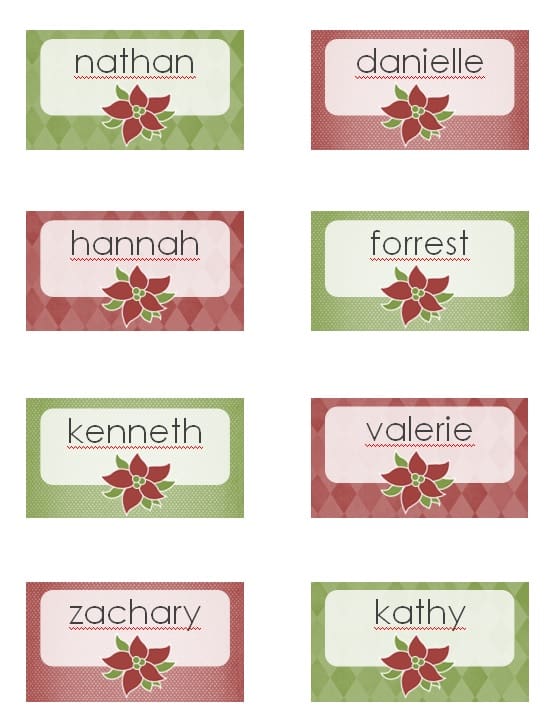
Seasonal colors, foliage, snowflakes, stars, or simple metallic accents can create atmosphere. Leave space for handwritten names if the guest list may change.
Conference or Workshop
Consider a flat or badge-style card showing name, organization, and role. Use large text and avoid overloading the card with schedules that belong in the event program.
Folded, Flat, or Held?
Folded tent cards stand without holders and are visible from across the table. They require accurate alignment so the name appears correctly after folding.
Flat cards rest on the plate, napkin, or table. They are easy to print and can double as a favor tag, but they may be harder to see from a distance.
Card holders add height and can suit formal tables, but ornate holders may hide names or crowd glassware. Test the full setting before ordering them in quantity.
Attached cards can be tied to a favor, menu, napkin, or small gift. Make sure guests still understand that the card identifies their seat.
Choosing Paper and Size
Cardstock should be heavy enough to stand yet suitable for your printer. A matte or lightly textured finish is easy to read and accepts handwriting. Glossy surfaces may reflect candlelight and resist some pens.
The card must fit the place setting without competing with plates, glasses, menus, favors, and floral arrangements. Print one sample, place it on a fully dressed table, and view it from the guest’s approach.
Ask the venue whether staff will place the cards and what size they prefer. Catering teams may need to see meal codes quickly during service.
Editing the Event Place Card Template
- Download the Word file and save a separate working copy.
- Replace the sample name with the first guest.
- Choose the final font before duplicating cards.
- Adjust colors, border, and event details.
- Test the longest guest name.
- Duplicate the layout for the full list.
- Add table, meal, or role codes only if needed.
- Review every card against the master guest list.
- Print one page on ordinary paper.
- Confirm orientation, trimming, and folding before using cardstock.
For a large list, Word mail merge may save time. Keep guest data in consistent columns, preview multiple records, and inspect the merged document before printing. Automation does not replace proofreading.
A Practical Production Timeline
Two to four weeks before: Confirm the table plan, design, paper, and printing method.
One week before: Verify names, titles, meal selections, and accessibility notes. Print the main set if the guest list is stable.
Two days before: Process final changes and print spares.
On setup day: Arrange cards using the latest seating plan and give staff the meal-code key.
Keep several blank cards, a matching pen, removable labels, and the editable file available for last-minute changes.
Proofreading a Place Card Set
Check the cards in two directions.
First, go card by card and compare each one with the guest list. Second, go down the guest list and confirm that every person has a card. This catches both spelling mistakes and missing records.
Then check:
- Duplicate names
- Incorrect table assignments
- Outdated titles
- Meal-code consistency
- Old dates left from a previous template
- Text cut off by margins
- Cards printed upside down after folding
If possible, ask someone who did not create the document to proof it. Familiarity makes errors easy to overlook.
Setting the Cards in the Room
Bring a printed seating plan arranged by table. Place cards before menus, favors, or napkins hide the seating area. Face each name toward the direction guests will approach.
For formal settings, coordinate with the venue captain. Staff may need a particular card position to recognize meal codes. Do not move a card casually once the catering plan is linked to seats.
After setup, walk the room as a guest would. Make sure table numbers are visible from the entrance and names can be read without touching every card.
Common Place Card Problems—and Easy Fixes
A guest cancels: Remove the card and tell service staff so the place setting and meal count can be adjusted.
Two guests have the same name: Add a surname, initial, role, or another respectful identifier.
A new guest arrives: Use a blank matching card and update the seating and meal team.
A name is too long: Reduce the size slightly, allow two lines, or widen the text area. Do not abbreviate without permission.
The card will not stand: Score the fold more precisely or use a small holder.
The ink smears: Match the printer setting to the paper and allow adequate drying time.
Download the Free Event Place Card Template
The preview below shows the editable design. Customize the names and event styling, create a card for each assigned seat, and keep blank spares for late changes.

Event Place Card FAQs
What is the difference between a place card and an escort card?
A place card marks a specific seat at the table. An escort card directs a guest to a table but may allow the guest to choose any available seat there.
Should place cards show first names or full names?
First names can suit a small informal gathering. Full names are clearer for large or formal events, especially when guests share first names.
Where should a place card go?
Common positions include above the plate, on the napkin, or in a holder near the top of the setting. Coordinate with the venue when cards communicate meal choices.
How do I show meal selections?
Use a discreet color-and-symbol system and give staff a key. Keep allergy and health information private and confirm serious requirements directly with the caterer.
Can I print these at home?
Yes, if your printer supports the chosen cardstock. Test alignment, color, drying time, cutting, and folding before printing the entire set.
How many spare place cards should I prepare?
Keep several blank cards and a matching pen. Larger or changeable events may need more spares than a small family dinner.
Can I use mail merge for guest names?
Yes. A spreadsheet and Word mail merge can produce a large set efficiently. Review the source data and inspect the merged document carefully.
Do casual events need place cards?
Not necessarily. Use them when assigned seating, meal service, accessibility, or guest navigation will benefit. Skip them when free seating supports the event better.
What font is best?
Choose a readable font with clear letterforms. Decorative fonts can be used sparingly, but guest names should remain easy to recognize at normal viewing distance.
Is the event place card template free?
Yes. Download the editable Word file and adapt it for your own legitimate celebration, dinner, meeting, or organized event.