

A business plan template gives you a structured outline for describing your business idea, market, operations, and finances in one document. Instead of facing a blank page, you can work through each section in order and build a plan that explains what the business does, who it serves, how it will make money, and what resources it needs.
Entrepreneurs, startup founders, small business owners, students in business courses, and organisations seeking funding all use business plans. Lenders and investors often ask for one, but a plan is just as valuable as an internal tool for testing ideas, setting priorities, and measuring progress. This blank template is useful whether you are starting a new venture or updating a plan for an existing business.
A complete business plan usually includes these key elements:
- Executive summary of the business and its goals
- Company description, mission, and legal structure
- Products or services and what makes them different
- Market analysis, target customers, and competitors
- Marketing and sales strategy
- Operations, management team, and key staff
- Financial plan, including startup costs, forecasts, and funding needs
- Milestones, risks, and supporting documents
Base your plan on real information. Use your own research, quotes from suppliers, and evidence from potential customers, and explain the assumptions behind any forecasts. Keep the writing clear and concise, especially in the executive summary, which many readers see first. Revisit the plan as you learn more; a business plan should guide decisions rather than sit unchanged in a folder.
It often helps to write the executive summary last. Once the other sections are complete, you will know the key points well enough to summarise them clearly in a page or less.
To use the template, download the file below and open it in Microsoft Word. Work through each section, replacing prompts with your information, and delete sections that do not apply. Add tables or charts for financial figures, then review the whole plan for consistency. Ask a trusted adviser to read it, make revisions, and export a PDF when you need to share it with lenders, investors, or partners.
Keep each version of the plan with a date in the filename. Comparing older versions with actual results is one of the best ways to learn how accurate your assumptions were and to make the next forecast more realistic.
Download the Free Business Plan Template
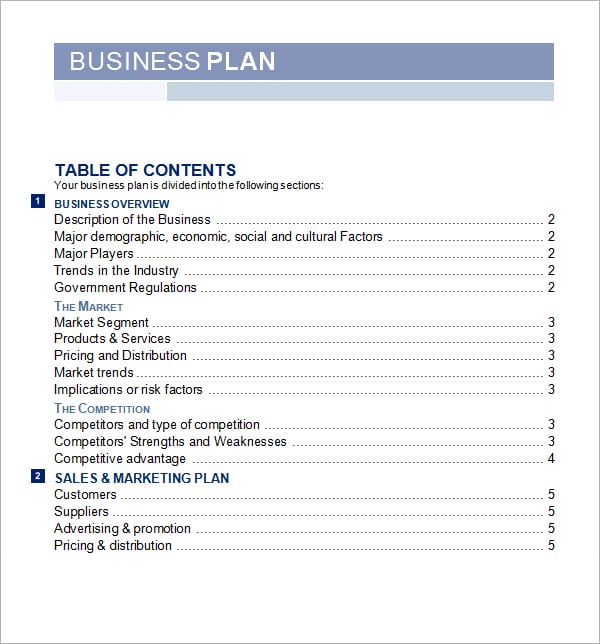
Preview the business plan template design below, then use the download button to save the editable Word file.
Blank Business Plan Template

More About the Business Plan Template
Planning is very effective tool to perform your task in sequence step. With the help of this free plan template we had done our work easily and efficiently. With a planning we make our work must better and save time. Planning template is used in every professional and personal life. It is used in business industries, offices, organization for complete their work easily. Free plan is prepared according to the need of the work. We offer you our prepared free plan template. Our selected free plan template you can use for every field of life and you can make your work easier. This template is prepared by our professional designer and attractive color selection gave a professional look. This is a ready to use format of free plan template. Find below you see attractive picture of our chosen free plan template. you can easily edit any content in this template because this template has been drafted in MS Word. Given below we provided you a download button for downloading this free plan template you just one click on this button and download it free from our website.
Click on the download button and make this free plan template your own.
What to Include in a Business Plan Templates
The exact content depends on your situation, but most versions should clearly cover objectives, priorities, owners, due dates, time blocks, progress indicators, notes, review dates, and follow-up actions. Arrange information in a logical order, placing the details readers need first near the top. Labels should be specific and familiar, while instructions should be short enough to scan quickly. If a field does not apply, delete it instead of leaving an unexplained blank.
Use plain language and avoid vague phrases that different readers could interpret differently. Where accuracy matters, include a reference number, version date, or responsible person. These small controls make the document easier to trace, update, and verify. For recurring use, create a clean master copy and save completed documents separately so the original is not accidentally overwritten.
How to Customize the Template
- Choose the closest layout. Select the design that already reflects your intended use, audience, and amount of information.
- Save an editable copy. Rename the downloaded file with a meaningful title, date, or version number before making changes.
- Replace every placeholder. Update sample names, dates, amounts, addresses, instructions, headings, and contact information.
- Adjust the structure. Add or remove rows and sections only where necessary, keeping spacing and heading levels consistent.
- Apply your visual identity. Add an approved logo, brand colors, and fonts without reducing readability or crowding the page.
- Review and test. Check spelling, calculations, links, page breaks, margins, and print appearance before distribution.
Choosing the Right Format
Start with the final use. A document completed on screen needs clear editable fields and enough room for typing. A printed version needs suitable margins, legible type, and adequate writing space. If the file will be emailed, keep the size manageable and consider exporting a locked PDF after editing so the layout remains stable. Retain the editable Word version for future revisions.
More detail is not always better. Include the information necessary to complete the task or support a decision, but remove decorative sections that do not serve the user. If several people will complete the document, use consistent labels and brief instructions. If it will be reused frequently, add a revision date and owner so staff can identify the current approved version.
Practical Quality and Safety Checks
Keep entries measurable, assign realistic dates, avoid overloading the page, review progress regularly, and archive completed versions when accountability matters.
Also check accessibility. Use descriptive headings, readable font sizes, strong color contrast, and meaningful link text. Do not rely on color alone to communicate status. For public-facing files, ask someone unfamiliar with the document to review it; fresh readers often find missing instructions or confusing labels that the creator overlooks.
Common Mistakes to Avoid
- Leaving sample text, old dates, or placeholder contact information in the final file.
- Changing fonts and spacing so heavily that the document loses its visual hierarchy.
- Using an attractive layout that does not provide enough room for real information.
- Sharing editable files when a final, non-editable PDF would be safer.
- Failing to verify totals, names, terms, links, or approval requirements.
- Overwriting the master template instead of saving a separate completed copy.
Plan the Business Plan Templates Before Editing
Before changing fonts or colors, decide what the finished planning document must accomplish. Write down the primary audience, the decision or action it should support, and the information that must be available when it is used. For a Business Plan Templates, the practical objective is to turn intentions into visible priorities, dates, ownership, and follow-up. This short planning step prevents unnecessary fields from being added and helps you recognize important omissions before distribution.
Map the document from the reader’s point of view. Put identifying information first, the working details in the middle, and approvals or next steps near the end. If the person or team responsible for completing the work will use the file differently, make each responsibility obvious through labels, instructions, or separate sections. A logical sequence reduces questions and makes the completed template easier to check.
Build a Clear Information Hierarchy
Readers should be able to scan the page and understand what matters without studying every line. Use one main title, descriptive section headings, and consistent subheadings. Group related fields together and keep labels close to the information they describe. Typical content may include objective, priority, owner, start and due dates, status, dependencies, notes, review date, and next action. Not every field is required in every case, so remove anything that does not contribute to the purpose.
Use bold text selectively for headings, totals, deadlines, or required actions. Avoid turning entire paragraphs into bold or capital letters because this weakens emphasis. Keep paragraph lengths manageable, align comparable information, and allow enough white space for handwritten or typed entries. A restrained hierarchy usually looks more professional than a page filled with borders, icons, and competing colors.
Create an Efficient Completion Workflow
A template is most valuable when different users can complete it consistently. Add brief instructions where mistakes are likely, but do not overload the page with explanations. Mark truly required fields, provide examples only when they prevent confusion, and specify the expected date, number, or naming format. If the document moves through several hands, state who prepares it, who reviews it, who approves it, and where the final copy is stored.
For repeated use, create a simple workflow: duplicate the approved master, rename the working copy, enter the information, verify supporting evidence, obtain approval, export the final version, and archive it. This process protects the clean master and makes it easier to locate earlier records. It also reduces accidental reuse of outdated names, dates, amounts, or instructions.
Frequently Asked Questions
Can I edit this Business Plan Templates in Microsoft Word?
Yes. Download the Word-compatible file, save a working copy, and replace the sample content. Depending on your Word version and installed fonts, you may need to make small spacing or font adjustments.
Can I use the template in Google Docs?
Usually. Upload the Word file to Google Drive and open it with Google Docs. Review tables, page breaks, fonts, and image placement because conversion can slightly change the layout.
How should I save the finished document?
Keep an editable master in Word format and export a PDF for printing or sharing when recipients should not alter the content. Use a descriptive filename containing the subject, date, and version where helpful.
Is the template suitable for every situation?
No universal template fits every organization, jurisdiction, or workflow. Customize it for your purpose, policies, and audience. For legal, tax, medical, safety, or regulatory matters, have an appropriately qualified professional review the final document.
How can I make the final result look professional?
Use one or two readable fonts, consistent heading styles, balanced white space, aligned elements, accurate information, and restrained colors. Proofread carefully and test both the digital and printed versions.
